
What Is an Entertainment Projector?

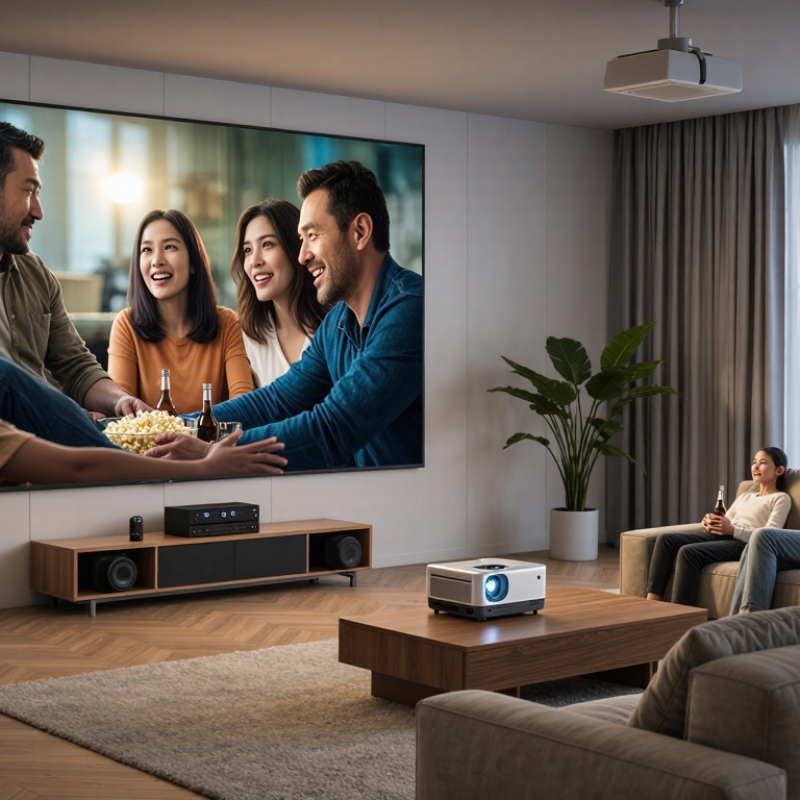
An Entertainment Projector is designed to turn a wall, screen, or even a temporary outdoor surface into a shared viewing space. Unlike office projectors, it prioritizes cinematic color, smooth motion, built-in streaming, and simple home setup. A typical living-room model may support 1080p or 4K input, HDR content, stereo speakers, and gaming features such as low input lag. Brightness still matters. A dim image can lose detail when daylight reaches the room.

Market data shows why this category deserves closer attention. Grand View Research’s 2024 projector market analysis estimates that the global projector market will continue expanding through 2030, supported by home entertainment, education, and business demand. Its reported growth outlook reflects rising interest in larger displays without the weight of a television. The Consumer Technology Association’s U.S. Consumer Technology Ownership and Usage Study also tracks continued household spending on connected entertainment devices, including streaming and home theater equipment. These reports do not define every projector as an entertainment product. That distinction needs care.

In practical terms, choosing an Entertainment Projector means balancing brightness, contrast, resolution, throw distance, and operating noise. A 2,000-lumen model may work well in a dark bedroom, while a brighter unit suits a family room with open curtains. Short-throw designs can create a 100-inch image from a coffee-table distance. Some specifications sound impressive but reveal little without independent testing. ANSI lumens, measured input lag, and verified color performance are more useful than vague marketing claims. The category is improving quickly, yet no single model fits every room. Personal viewing habits still decide the better choice.
What Is an Entertainment Projector?

Definition and Purpose of an Entertainment Projector

What Is an Entertainment Projector?

Definition and Purpose of an Entertainment Projector

An entertainment projector is a display device that enlarges video, photographs, games, and presentations onto a wall or screen. It uses a light source, imaging system, and lens to create a visible picture. Unlike a small television, it can produce a cinema-like image across a much larger area.

Its purpose is simple: make shared viewing more immersive. In a living room, a projector may show a 100-inch film image above a low cabinet. In a bedroom, it can display a concert recording on a blank wall. Some models include speakers, wireless connections, and automatic focus. However, these features do not guarantee a better experience.

Room conditions matter greatly. Dim lighting usually improves contrast and shadow detail. A pale, smooth wall can work, but a dedicated screen often gives more consistent results. Viewers should also check throw distance, image resolution, fan noise, and connection compatibility before choosing a setup.

A practical installation needs careful adjustment. The lens should face the screen directly whenever possible. Digital image correction can help, but heavy correction may reduce sharpness. I have found that users often focus on brightness ratings and overlook placement. That is an easy mistake. Projectors also need regular filter or ventilation checks, depending on their design.

Performance is not always perfect. Dark scenes may look gray in a bright room, and built-in speakers can sound thin. Still, with controlled lighting, suitable audio, and accurate placement, an entertainment projector can turn an ordinary wall into a flexible viewing space.

Core Components and How They Work

An entertainment projector turns digital video into a large image through several coordinated components. The process begins with an input signal from a media player, game console, or computer. The projector’s processor decodes that signal and prepares separate color information.

The light engine provides the brightness. It may use an LED, laser, or traditional lamp. A DLP system reflects light from thousands of tiny movable mirrors. An LCD system passes light through small liquid-crystal panels. Both methods create the image differently, yet each depends on accurate color control. A color wheel may appear in some designs, while other systems produce colors simultaneously. The choice affects motion, brightness, and possible rainbow artifacts.

The lens enlarges and focuses the finished image onto the wall or screen. Focus adjustment changes sharpness, while optical zoom changes image size without moving the projector. Digital keystone correction reshapes angled images, but it can reduce fine detail. I have found that a slightly imperfect physical alignment often looks cleaner than heavy digital correction. Cooling fans remove heat from the light engine and processing board. Without steady airflow, brightness may fall and internal parts can age faster.

Speakers handle basic sound, although separate audio equipment usually creates clearer dialogue and deeper bass. Connectivity ports carry video, audio, and control signals. A reliable setup also needs suitable throw distance, wall color, and room darkness. Bright images can still look flat in daylight. That limitation is easy to underestimate.

Key Features and Performance Specifications

What Is an Entertainment Projector?

Key Features and Performance Specifications

An entertainment projector displays films, games, and streaming content on a large screen or wall. Its performance depends on more than image size. In a dim living room, 1,500 to 2,500 ANSI lumens can produce a comfortable picture. Bright rooms need higher output, but excessive brightness may wash out dark scenes. A brighter image is not always better.

Resolution affects sharpness. Full HD suits most movie nights, while 4K resolution reveals finer details in subtitles, landscapes, and game interfaces. Contrast performance matters just as much. Strong contrast creates deeper blacks and clearer shadow detail. However, published contrast figures can use different testing methods. They should not be compared blindly.

Input lag is important for gaming. A figure below 30 milliseconds usually feels responsive, while competitive players may prefer less than 20 milliseconds. Refresh rates of 60Hz handle films and ordinary games, although 120Hz can make fast movement smoother. Look for HDR support, accurate color modes, and useful adjustment features, such as keystone correction or lens shift. Keystone correction is convenient, but heavy use can slightly reduce image clarity. Throw ratio also deserves attention. It determines the distance needed for a chosen screen size. During setup, I have found fan noise easy to underestimate. A quiet room can make a small mechanical hum surprisingly noticeable. Specifications help, but real viewing conditions still decide whether the projector feels right.

What Is an Entertainment Projector? - Key Features and Performance Specifications

Specification or Feature Typical Performance Range What It Means Recommended Use
Native Resolution 1280 × 720 to 3840 × 2160 pixels Determines image detail. Full HD and 4K-compatible models provide sharper text, movies, and game graphics than HD models. Choose Full HD for general home entertainment and 4K resolution for large screens or highly detailed content.
Brightness 1,000 to 3,500 ANSI lumens Indicates the measured light output. Higher brightness helps maintain image visibility when some ambient light is present. Approximately 1,000–2,000 ANSI lumens suits dark rooms, while 2,000–3,500 ANSI lumens is more suitable for living rooms.
Contrast Performance Native contrast commonly ranges from 500:1 to 5,000:1 Affects the difference between dark and bright areas. Higher native contrast can improve shadow detail and perceived depth. Higher contrast is especially valuable for movies, science fiction, and other content with dark scenes.
Projection Technology LCD, DLP, or LED/LCD hybrid designs Different optical systems influence color reproduction, motion handling, image uniformity, and maintenance requirements. DLP often provides sharp motion, while LCD designs can offer strong color brightness. LED light sources generally reduce lamp maintenance.
Light Source LED, laser, or traditional lamp LED and laser sources typically offer longer service life and faster start-up than replaceable lamps. LED is suitable for casual viewing; laser is useful for frequent use and installations requiring consistent brightness.
Light-Source Life About 3,000–6,000 hours for lamps; 20,000–30,000 hours for many LED or laser systems Represents estimated operating time before brightness declines significantly. Actual life depends on operating mode and ventilation. Long-life LED or laser models are convenient for daily streaming and family entertainment.
Color Performance 16.7 million colors or more; coverage varies by imaging system Color processing and brightness consistency affect skin tones, animation, sports, and gaming visuals. Look for accurate color modes and adjustable color temperature for movie and television viewing.
Refresh Rate Typically 60 Hz; some models support 120 Hz input or display modes Controls how frequently the image updates. Higher refresh rates can make fast movement appear smoother when supported by the source. 60 Hz is adequate for films and television. A higher supported rate is beneficial for compatible games and sports content.
Input Lag Approximately 16–50 milliseconds in game mode Measures the delay between an input command and the image appearing on screen. Lower values improve responsiveness. For casual gaming, under 50 ms is generally usable; competitive players should look for the lowest available setting.
Throw Ratio Approximately 0.25:1 to 2.0:1 Describes the distance required to create a particular image width. A lower ratio projects a larger image from a shorter distance. Short-throw models work well in small rooms, while standard-throw models offer more flexible placement at greater distances.
Screen Size Commonly 80 to 150 inches diagonally Entertainment projectors can create a much larger image than most televisions, depending on brightness and viewing distance. A 100–120-inch screen is a practical range for many home theaters and living rooms.
Focus Adjustment Manual or powered focus Focus control keeps text, subtitles, and fine image details sharp across the screen. Powered focus is convenient for ceiling-mounted or hard-to-reach installations; manual focus is common on portable models.
Keystone Correction Typically ±15° to ±40° vertically; some models also support horizontal correction Corrects trapezoidal distortion when the projector is not positioned perpendicular to the screen. Useful for temporary setups, although physically aligning the projector usually preserves better image quality.
Lens Shift Available on selected home-theater models; range varies by lens design Moves the image optically without tilting the projector, reducing distortion compared with digital keystone correction. Recommended for permanent installations where precise placement and image quality are important.
Built-In Audio Typically 2–20 watts total output Integrated speakers provide convenient sound without requiring separate equipment, but they generally cannot match a dedicated sound system. Suitable for casual viewing, travel, classrooms, and small rooms. Use external speakers for stronger dialogue and bass.
Audio Support 3.5 mm audio output, Bluetooth, HDMI audio, or optical output depending on model Connectivity determines how easily the projector can work with headphones, soundbars, AV receivers, and wireless speakers. Check compatibility with the preferred speaker system before purchase, especially when using Bluetooth audio.
Connectivity HDMI is standard; USB, wireless networking, Bluetooth, and streaming support may also be included More connection options make it easier to use streaming devices, game consoles, computers, storage drives, and mobile devices. At least one HDMI input is essential. Multiple HDMI ports are convenient for systems with several source devices.
Supported Video Signals Commonly 720p, 1080p, and selected 4K input signals Input compatibility does not always mean the projector displays the signal at its native resolution. Confirm both the supported input format and the native display resolution before selecting a model.
Operating Noise Approximately 25–40 dB in standard or eco mode Fan noise can affect quiet movie scenes, dialogue, and immersive viewing. For bedrooms and small rooms, a lower noise rating is preferable. Eco mode is often quieter than maximum-brightness mode.
Portability Roughly 1–8 kg, depending on design and brightness Compact projectors are easier to move, while larger units commonly provide higher brightness, stronger cooling, and more installation features. Choose a lightweight model for travel and occasional use; choose a larger chassis for permanent home cinema setups.
Recommended Room Conditions Dark or dimly lit rooms provide the best image quality Ambient light reduces perceived contrast and can make black areas appear gray, even when brightness is high. Use curtains, controlled lighting, and a suitable screen to improve contrast and color visibility.
Typical Entertainment Applications Movies, streaming video, sports, console gaming, family events, and outdoor viewing Entertainment projectors prioritize large-screen convenience, simple setup, and flexible content playback. Match the projector to the main activity: low input lag for gaming, high brightness for sports, and strong contrast for movies.

Note: Performance figures are typical industry ranges rather than specifications for a particular product. Actual results vary according to projector design, screen material, image mode, room lighting, source quality, and installation conditions.

Common Types and Entertainment Applications

What Is an Entertainment Projector?

Common Types and Entertainment Applications

An entertainment projector creates large images for films, games, sports, and social viewing. Unlike business projectors, it often prioritizes color, motion handling, built-in speakers, and simple setup. Common types include portable LED projectors, short-throw models, and high-brightness home cinema units. LED models use less energy and start quickly. Short-throw units can produce a large picture from a small room. However, they may reveal wall texture more clearly.

Home cinema projectors suit dark rooms and detailed movie playback. Portable models work well for bedrooms, outdoor gatherings, or temporary gaming spaces. Sports viewing needs stronger brightness, especially during daylight. This matters as home entertainment continues to expand. The Motion Picture Association’s 2023 THEME Report recorded 118.3 billion dollars in global home and mobile entertainment revenue. That figure suggests demand for flexible viewing spaces, not only traditional televisions. Still, market figures do not guarantee a better viewing experience. Room lighting, screen quality, and seating distance can matter more than resolution alone.

Tips: Measure the throw distance before buying. Test brightness after closing the curtains. A white wall is convenient, but a proper screen usually improves contrast. Keep gaming latency below about 30 milliseconds when possible. Do not trust specifications without viewing conditions. The “best” projector can still feel disappointing in a bright room.

Common Entertainment Projector Resolutions by Total Pixels

Resolution is one of the main factors that determines image detail in an entertainment projector. HD is suitable for basic movie nights and casual gaming, Full HD is widely used for home cinema and sports viewing, while 4K UHD provides greater detail for large screens, premium movies, and immersive gaming. Pixel counts are calculated from each format’s standard horizontal and vertical resolution.

Selection, Setup, and Maintenance Considerations

What Is an Entertainment Projector? Selection, Setup, and Maintenance Considerations

Choosing an entertainment projector starts with the room, not the specification sheet. Measure the wall, viewing distance, ceiling height, and ambient light before comparing models. A short-throw design suits compact rooms, while a standard-throw unit needs greater depth. Calculate throw ratio carefully. A small error can place the image behind furniture or outside the screen.

AVIXA’s 2024 Industry Outlook and Trends Analysis estimated global professional audiovisual revenue at approximately $332 billion in 2023. This scale reflects growing demand for controlled, high-quality viewing environments, including residential entertainment spaces.

Brightness should match the room, but excessive brightness can reduce perceived contrast. For dark rooms, moderate output and accurate black levels often produce a more comfortable image.

Look for low input lag when displaying games or fast action. Support for HDR standards can improve highlights, though results depend on content and calibration.

Test skin tones, subtitles, and shadow detail. Numbers alone are insufficient. Measure twice.

Installation also affects performance.

Leave clear airflow around the chassis, avoid enclosed shelves, and use a level mount.

The U.S. Department of Energy reports that cooling and ventilation strongly influence equipment energy performance, a useful reminder for projector placement.

Clean filters according to the manual, inspect vents monthly, and keep dust away from the lens. Dust wins. Laser light sources generally reduce lamp replacement, but they do not eliminate maintenance.

A neglected projector may develop noise, overheating, or uneven brightness.

I would also revisit the setup after several weeks; seating habits and daylight often expose flaws that initial testing misses.

We will help turn your vision into reality

Contact Us